How to Sublimate Ceramic Trinkets
To sublimate onto ceramic trinkets, use a polymer-coated blank, print a mirrored design with sublimation ink, then secure and press it using the blank maker's time and temperature instructions.
On this page (8 sections)
- What do you need to sublimate onto ceramic trinkets?
- How do you check the ceramic coating?
- How do you prepare a small design?
- How do you position the transfer on a trinket?
- How do you press ceramic trinkets?
- What should you check after pressing?
- Can you use the same steps on other craft blanks?
- How do you get a clean ceramic trinket transfer?
To sublimate onto ceramic trinkets, use a polymer-coated ceramic blank, print a mirrored design with sublimation ink, and press it using the blank maker's recommended settings. Secure the transfer so it cannot shift, and protect the press from ink or coating residue.
Small trinkets need careful positioning because even a slight shift can leave a visible edge or blur. Confirm the printable area and coating before printing, then use the blank's instructions for heat, pressure, and time.
What do you need to sublimate onto ceramic trinkets?
You need a coated ceramic trinket, sublimation printer and ink, sublimation paper, heat-resistant tape, and a compatible press. Gather protective gloves and a clean, heat-safe work surface before heating the blank.
Check that the trinket is sold for sublimation or has a suitable polymer coating. The image transfer relies on that surface; plain ceramic may not hold sublimation dye as intended.
Measure the flat area where the design will go. Leave a small margin around the edges, especially if the blank has a hole, raised rim, or curved section.
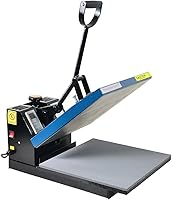
The Fancierstudio Digital Heat Press 15 x has electronic time and heat controls, adjustable pressure, and a 15-by-15-inch heat platen. A small trinket uses only part of that surface, so position it securely and follow the blank maker's settings.
How do you check the ceramic coating?
Look for a blank specifically intended for sublimation and follow its preparation instructions. If you plan to apply a coating yourself, use a product designed for sublimation and apply it as directed.
A standard glazed surface isn't automatically sublimation-ready. The coating needs to accept the transfer, and uneven application can lead to uneven color or areas that fail to transfer.
For a separate coated surface, our guide explains how to use sublimation coating spray. That method may suit a suitable blank, but follow the coating maker's directions for coverage and drying before pressing.
Ceramic blanks can differ in shape and finish. For a larger flat surface, see how to sublimate on ceramic tiles; the same preparation principles apply, though a trinket's smaller area needs more precise placement.
How do you prepare a small design?
Size the artwork to the trinket's flat printable area, then mirror it before printing if the image or text must face a certain way. Keep important details away from edges and openings.
Print with sublimation ink onto sublimation paper, using the print settings recommended for your paper and printer. Let the print dry if the paper instructions call for it, and avoid touching the printed surface.
Cut the transfer close to the design if excess paper could overlap the blank. For a round trinket, trim corners or use a few small relief cuts in the paper margin so it can sit flat without folding over the image.
Waterslide decal paper is a different process from sublimation paper. Hayes Paper Co. waterslide paper is made for inkjet printing and uses a sealed, soaked decal transfer process, so it isn't a substitute for sublimation supplies.
If your project may be better suited to a decal, read the steps for how to sublimate ceramic tiles alongside the distinct waterslide method before choosing materials. For plain ceramic without a sublimation coating, see whether you can sublimate ceramic.
How do you position the transfer on a trinket?
Center the design on the printable face and secure the paper with heat-resistant tape. Check alignment from more than one angle before pressing, since a small blank leaves little room for correction.
Place the printed side against the coated ceramic as directed for your paper and blank. Use enough tape to stop movement, but keep tape away from the artwork when possible.
For a trinket with a hole, align the design around the opening before taping. If the blank is curved, confirm the transfer can contact the printable area evenly; wrinkles and gaps can cause incomplete coverage.
Wear heat-resistant gloves when handling hot blanks. The KITCHEN PERFECTION Smoker BBQ Grill Gloves -High have a cotton inner layer and silicone outer layer, with a five-finger design; use protective gear suitable for your heat press and follow its safety instructions.
How do you press ceramic trinkets?
Use the temperature, pressure, and time recommended for the exact trinket blank. Set the press, position the taped transfer and blank as directed, and keep hands clear while the press is closed.
There is no single setting that fits every ceramic trinket. Coating, thickness, shape, and press design can change the needed setup, so don't copy a time and temperature from a mug or tile without checking the trinket's instructions.
If your press has adjustable pressure, use the blank maker's guidance. Too little contact can leave pale areas, while excessive pressure may put stress on the ceramic or affect the transfer.
When the cycle ends, open the press carefully and use heat-resistant gloves to move the blank to a heat-safe surface. Let it cool as directed before removing the transfer, since hot ceramic can burn skin and sudden temperature changes may damage some blanks.
What should you check after pressing?
Inspect the design after the blank has cooled enough to handle safely. Look for shifted edges, pale patches, blurred details, or areas where the image did not transfer.
A faded section can point to poor contact, incorrect settings, or a coating problem. A doubled edge often means the paper moved during pressing, so use more secure taping and check the blank's shape next time.
Record the blank type and settings that worked for your setup. Make adjustments one at a time, within the blank maker's directions, so you can tell which change affected the result.
Can you use the same steps on other craft blanks?
The basic process is similar, but each material needs its own compatible surface and settings. Don't assume ceramic instructions transfer directly to faux leather, wood, or a wind spinner.
For other materials, check whether sublimation works with the surface and how to prepare it. Start with our guides to sublimating on faux leather, sublimating wood, and how to do sublimation on a wind spinner.
How do you get a clean ceramic trinket transfer?
For a clean result, use a coated blank with a flat printable area, a design sized to that area, and secure tape. Follow the blank's own settings and handle the hot ceramic with suitable protection.
Choose a heat press with controls that let you set time and temperature for your blank. If you don't have a sublimation-ready trinket, confirm whether a suitable coating or a different transfer method fits the project before printing.
Frequently asked questions
Can you sublimate onto any ceramic trinket?
No. The ceramic needs a polymer sublimation coating, or a coating made for sublimation, to hold the transferred dye.
A plain glazed trinket may not accept the image.
Check the blank's instructions for its coating, size, heat limits, and pressing method before you start.
What temperature do you use for ceramic trinkets?
Use the time and temperature specified for your exact blank and press. Ceramic coatings, shapes, thicknesses, and heat presses vary, so a setting from a tile or mug may not transfer well to a small trinket.
Follow the blank maker's directions and adjust only through careful, documented tests.
Do you mirror a sublimation design for a ceramic trinket?
Yes, mirror the design before printing if it includes text or an image that needs to read in a particular direction after transfer. A symmetrical design may look unchanged when mirrored, but checking the print preview helps prevent reversed lettering on the finished trinket.
Can you use waterslide decal paper for sublimation?
No. Waterslide decal paper uses a separate transfer method and is not sublimation paper.
It can transfer inkjet artwork to compatible surfaces, but the steps involve sealing, soaking, and sliding the decal into place.
Use sublimation paper and sublimation ink for a sublimation transfer.