How to Sublimate Ceramic Tiles
Use a sublimation-ready coated ceramic tile, print a mirrored design with sublimation ink, then press it with firm, even contact using the blank maker's time and temperature settings.
On this page (8 sections)
- Can you sublimate on ceramic tiles?
- What supplies do you need to sublimate a tile?
- How do you prepare a ceramic tile for sublimation?
- How do you press a sublimation transfer onto a tile?
- How can you prevent common tile sublimation problems?
- Is waterslide decal paper the same as sublimation paper?
- How do you finish and display a sublimated tile?
- What is the simplest way to sublimate on ceramic tiles?
Sublimate a ceramic tile by pressing a mirrored sublimation-ink transfer onto a sublimation-ready coated blank. Follow the blank maker's time and temperature directions, because coating and tile thickness affect the result.
A plain ceramic tile does not have the surface needed to hold sublimation ink. Choose a tile with a compatible polymer coating, keep the design flat against it, and use protective paper to catch stray ink.
Can you sublimate on ceramic tiles?
Yes, if the tile has a sublimation coating. The coating gives sublimation ink a surface to bond with under heat; ordinary ceramic without that coating won't produce the same lasting image.
Look for a blank described as sublimation-ready and check its instructions for pressing. A coating spray may be an option for some surfaces, but it needs careful application and curing; our guide explains how to use sublimation coating spray.
A coated tile is a better fit for a decorative plaque, keepsake, or small wall piece than for a surface that will be cut or handled like floor tile. Plan the tile's use before choosing a blank and finish.
What supplies do you need to sublimate a tile?
Gather a coated tile, sublimation printer and ink, transfer paper, heat press, heat tape, and protective sheets. The tile's instructions should guide the press setup.
Use a heat-resistant surface and keep the work area clear. Check that the tile sits level and that the press can apply even pressure across its face.
You may also want heat-resistant gloves for handling hot materials after pressing. The KITCHEN PERFECTION Smoker BBQ Grill Gloves -High have a cotton lining and a silicone outer layer.
These are cooking and grilling gloves, so don't treat them as a substitute for press-specific safety steps or as protection from every hot surface. Keep your hands away from the heat platen and follow the press manual.
How do you prepare a ceramic tile for sublimation?
Start with a clean, dry tile and a design sized to its printable face. Remove dust or lint so it won't transfer into the image.
- Confirm the blank is coated for sublimation and read its pressing directions.
- Measure the tile's printable area, leaving a small margin if the coating edge is uneven.
- Create the design at the intended size and mirror it before printing.
- Print with sublimation ink on sublimation transfer paper, using the settings recommended for your printer and paper.
- Let the print dry, then trim excess paper if it could wrap around the tile.
Handle the printed transfer by the edges. Fingerprints, moisture, or creases can show in the finished image.
If you don't have a sublimation-ready tile, compare methods before proceeding. [Can you sublimate ceramic?
A quick answer](/can-you-sublimate-ceramic/) covers the surface requirement, while how to sublimate ceramic trinkets walks through a related small blank.
How do you press a sublimation transfer onto a tile?
Place the transfer face down on the tile and use the blank's recommended press settings. Secure it with heat tape so the paper won't shift as you close the press.
Put protective paper beneath and above the tile to catch ink residue. Position the tile so the design area receives even contact, then press for the time given by the blank maker.
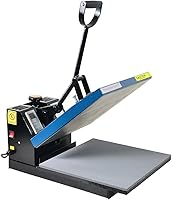
The Fancierstudio Digital Heat Press 15 x has a 15-by-15-inch heat press sheet, electronic time and heat controls, and adjustable pressure. Its time range is 0–999 seconds; use the tile maker's directions to set the actual time and temperature.
After the press cycle, open the press carefully and lift the transfer without sliding it across the tile. Let the tile cool as directed before handling or checking the image.
Do not use a setting from another tile as a guarantee. Coating, thickness, press type, and pressure can all affect how the transfer looks.
How can you prevent common tile sublimation problems?
Keep the tile clean, the transfer still, and pressure even. These basics help avoid spots, ghosting, and pale areas.
- Faded or pale image: Check that the tile is coated for sublimation and that the paper was printed with sublimation ink. Review the press settings and contact across the surface.
- Ghosted edges: The transfer may have moved while the press opened. Secure it firmly with heat tape and lift it straight away.
- White specks: Dust or lint may have been trapped under the paper. Wipe the tile with a clean lint-free cloth before positioning the transfer.
- Uneven color: The tile may not have sat flat, or pressure may have varied. Check the press surface and tile placement before another attempt.
- Ink marks near the edge: Use protective paper and trim excess transfer paper so stray ink cannot touch the tile.
Test a spare tile or small design first when you are learning a new blank. Keep notes about the tile model and settings that worked so you can repeat the process.
Is waterslide decal paper the same as sublimation paper?
No. Waterslide decal paper applies a printed decal film, while sublimation transfers ink into a compatible coated surface with heat.
Choose the technique that matches the material and finish you want.
Hayes Waterslide Decal Paper for Inkjet Printers comes in 20 clear A4 sheets and is designed for inkjet printing on crafts such as ceramic, glass, metal, and plastic. Its instructions call for printing, sealing with clear acrylic spray, soaking the cut decal in water, then sliding it onto the surface.
This paper is not sublimation transfer paper, and the process differs from heat pressing sublimation ink. Follow the paper's directions and confirm that the chosen surface suits a waterslide decal.
For other project surfaces, see can you sublimate on faux leather and can you sublimate on wood. Those materials also need a compatible surface or coating for the chosen transfer method.
How do you finish and display a sublimated tile?
Let the tile cool fully, then display it where its coating and backing will stay protected. Use a stand, frame, or tile holder made for the size and weight.
Avoid assuming that a decorative sublimated tile is suitable for floors, food contact, or outdoor exposure. The coating and blank instructions determine how the finished piece should be used and cleaned.
For a rotating outdoor decoration, a tile is a different project from a wind spinner. See how to do sublimation on a wind spinner for its time and temperature considerations.
What is the simplest way to sublimate on ceramic tiles?
To sublimate on ceramic tiles, choose a coated blank, print a mirrored sublimation transfer, tape it in place, and press to the blank's directions. Cleanliness, even contact, and a stable transfer matter more than guessing at a universal setting.
Pick a sublimation-ready tile for a heat transfer image. Choose waterslide decal paper when you want to apply an inkjet-printed decal instead, and follow that paper's sealing and soaking steps.
Frequently asked questions
Can you sublimate on any ceramic tile?
No. Sublimation needs a polymer coating to bond the ink, so use a tile sold as sublimation-ready or one coated with a suitable sublimation coating.
Ordinary uncoated ceramic tile won't take a durable sublimation image.
Check the blank maker's press instructions before starting.
What temperature do you use to sublimate ceramic tiles?
Use the temperature and time recommended for your specific coated tile and press. Tile size, coating, thickness, and press setup can change the right settings, so there is no single reliable setting for every blank.
Make a small test before producing a finished gift.
Do you mirror an image for ceramic sublimation?
Yes, mirror the design before printing if it includes words, numbers, or directional elements. The transfer is placed face down, so the image reverses during pressing.
A mirrored print should read correctly once transferred to the tile.
Can you use regular inkjet paper for sublimation on tile?
No. Use sublimation transfer paper with sublimation ink for the heat transfer process.
Regular inkjet ink and ordinary paper do not become a sublimation transfer just because you press them onto ceramic.
Waterslide decal paper is a different method that applies a printed film to the surface.