How to Use Cricut for Sublimation Printing
To use Cricut for sublimation printing, print a sublimation design with a compatible printer and paper, then use Cricut to cut it if needed. A heat press transfers the printed design to a compatible blank.
On this page (9 sections)
- Can you use Cricut for sublimation printing?
- What does each part of a Cricut sublimation setup do?
- How do you use Cricut for a sublimation transfer?
- Can you use Cricut Infusible Ink instead?
- What blanks work for sublimation?
- How do you cut a sublimation design with Cricut?
- Which Cricut sublimation supplies should you choose?
- What can you make with Cricut sublimation?
- What is the right way to use Cricut for sublimation printing?
To use Cricut for sublimation printing, print the design with a compatible sublimation printer and paper, then use Cricut to cut it if needed. A heat press transfers the printed design to a compatible blank; the Cricut itself doesn't print sublimation ink.
Think of the setup as four separate jobs: the printer creates the color image, the paper carries the ink, the Cricut cuts or helps position the design, and the heat press applies it. Matching each part to the project helps avoid buying the wrong supplies.
Can you use Cricut for sublimation printing?
Yes, you can use a Cricut cutting machine as part of a sublimation project, but it isn't the sublimation printer. It can cut a printed design around its outline or cut other materials used in the project.
For a full-color sublimation image, you need a compatible sublimation printer and sublimation ink. You can create the artwork in Cricut Design Space or another design program, but the printer handles the printing.
A basic workflow is:
- Create or prepare the design.
- Print it on sublimation paper with a compatible sublimation printer.
- Use Cricut to cut the print if the design needs a cut outline.
- Position the transfer on a suitable blank.
- Use a heat press according to the instructions for the blank, ink, and press.
Some projects don't need Cricut at all. If the image is a simple rectangle or can be trimmed by hand, the cutter is optional.
What does each part of a Cricut sublimation setup do?
The printer, cutter, paper, and heat press each do a different job. A Cricut project can include all four, but no single machine replaces the others.
What printer do you need for sublimation?
A compatible sublimation printer lays down sublimation ink on transfer paper. Check the printer maker's instructions to confirm that the model and ink are suitable for sublimation.
A Cricut machine is not a substitute for that printer. Cricut can cut printed designs, but it won't turn ordinary inkjet ink into sublimation ink.
What is Cricut sublimation paper?
“Cricut sublimation paper” generally means sublimation transfer paper used in a Cricut project. It is the paper for printing and transferring sublimation ink, not paper that makes a Cricut machine print.
Choose paper made for sublimation and check its instructions for your printer and blank. “Sublimation paper Cricut,” “Cricut sublimation paper,” and “sublimation paper for Cricut” are often search phrases for that same supply.
A separate material called waterslide decal paper works differently. The Hayes Waterslide Decal Paper for Inkjet Printers is designed for inkjet printing and a water-slide decal process, so it isn't a substitute for sublimation transfer paper.
What does the Cricut cutter do?
Cricut cuts the printed transfer or other project materials to shape. That can help with a design that needs a precise outline, but it doesn't print the color image.
If you're making a cut outline, prepare the file so the printed image and cut path line up. Cricut's guide to creating sublimation designs in Cricut can help with the design setup.
What does a heat press do?
A heat press applies heat and pressure to transfer the design to a compatible blank. Follow the instructions for the specific transfer materials and blank, since suitable settings vary.
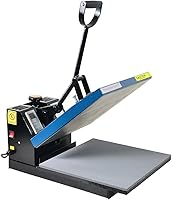
For apparel and other flat projects, a press with a flat platen can help keep the transfer area even. The Fancierstudio Digital Heat Press 15 x 15 has a 15-by-15-inch platen, electronic time and heat control, and adjustable pressure.
Use heat-resistant gloves when handling hot items, and keep hands clear of the platen. The KITCHEN PERFECTION gloves have a cotton inner layer and silicone outer material; they are described for grilling and cooking, so check their fit and suitability for your craft setup.
How do you use Cricut for a sublimation transfer?
Print first, cut if needed, then press the transfer onto a compatible blank. Confirm the paper, ink, blank, and heat press instructions before starting the project.
- Prepare the artwork. Set the size for the blank and add a cut outline only if you need Cricut to trim it.
- Print on sublimation paper. Use the correct side and printer settings stated by the paper maker.
- Cut with Cricut if needed. Set up the printed image and cut path according to your machine's guidance.
- Prepare the blank. Make sure its surface is suitable for sublimation and follow its care or pressing instructions.
- Position the transfer. Secure it as directed so it doesn't shift during pressing.
- Press and let the item cool as instructed. Use the time, temperature, and pressure specified for the materials.
For a design that doesn't need a cut edge, you may be able to trim the paper by hand. Don't assume every Cricut, printer, paper, or blank works with every other one.
Can you use Cricut Infusible Ink instead?
Cricut Infusible Ink is a separate transfer option, while printable sublimation projects use a compatible printer, sublimation ink, and transfer paper. Choose based on the design and materials you plan to use.
Infusible Ink sheets can suit ready-made designs and cut shapes. Follow the process in how to use Cricut Infusible Ink sheets and check the blank requirements before pressing.
Pens offer another route for drawn designs. For press options suited to pen projects, compare heat presses for sublimation pens.
See how to use Cricut Infusible Ink pens if you're planning a project that uses them.
The terms can be confusing because both methods use heat. Cricut Infusible Ink isn't vinyl, and sublimation transfer paper isn't the same as a cuttable sheet of Infusible Ink.
This guide to Cricut Infusible Ink and vinyl explains the difference.
What blanks work for sublimation?
Use a blank whose surface is made for sublimation, and follow the blank maker's pressing instructions. If you need to prepare a surface, see how to use sublimation coating spray.
The process is commonly used on suitable polyester fabric and specially coated hard surfaces.
A regular cotton shirt may not hold a sublimation transfer the way a polyester blank does. For apparel, check the material composition and use the right process; how to use Cricut Infusible Ink on T-shirts covers a related shirt project.
Mugs and coasters need surfaces made for the chosen transfer method. If you plan to use Infusible Ink on drinkware, see how to use Cricut Infusible Ink sheets on a mug and how to make Infusible Ink coasters.
How do you cut a sublimation design with Cricut?
Use Cricut when your printed design needs a shaped edge or precise cut. The exact steps depend on how the file is prepared and on your Cricut model.
Keep the cut outline separate from the printed artwork in your design workflow. Check print size, placement, and any mirroring requirements in the printer, paper, and blank instructions before making the final transfer.
If you are cutting Infusible Ink sheets instead of printed sublimation paper, use the material-specific steps in how to cut Cricut Infusible Ink. The cut settings and handling can differ by material.
Which Cricut sublimation supplies should you choose?
Start with the supplies that match your blank and transfer method. A printer and sublimation paper are needed for printable sublimation; Cricut is optional if you need to cut the image.
Choose the Fancierstudio press if a 15-by-15-inch flat press fits your project size and workspace. Its adjustable pressure and electronic controls are relevant features, but confirm that its instructions suit the blank and transfer materials you use.
The Kitchen Perfection gloves are made for grilling and cooking, so don't assume they are a craft-specific safety accessory. Check their fit and intended use before relying on them near a heat press.
Hayes waterslide decal paper is for inkjet-printed decals applied with water, not sublimation. Keep it separate from your sublimation paper to avoid using the wrong transfer process.
What can you make with Cricut sublimation?
You can make custom designs on compatible blanks, such as suitable shirts, mugs, and coasters. The blank material and transfer method determine whether a project is a good fit.
Cricut can cut a printed design to shape, while the printer and press handle the sublimation transfer. For more project ideas using Cricut Infusible Ink, browse Cricut Infusible Ink projects, and read about whether Cricut Infusible Ink transfers white designs if your artwork includes white.
People comparing print methods may also want to read sublimation vs. inkjet printing or whether sublimation is better than screen printing. Those methods have different materials and workflows.
What is the right way to use Cricut for sublimation printing?
For how to use Cricut for sublimation printing, match each tool to its role: a compatible printer prints sublimation ink, transfer paper carries it, Cricut cuts when needed, and a heat press applies it to a suitable blank.
Choose printable sublimation when you need a custom printed image. Choose Infusible Ink sheets or pens when those materials suit the design, and use waterslide paper only for a water-applied decal project.
Frequently asked questions
Can a Cricut print sublimation designs?
No. A Cricut cutting machine cuts materials and can draw with compatible pens, but it does not print a full-color sublimation design.
Use a compatible sublimation printer and sublimation ink to print, then use the Cricut to cut around the design if needed.
What is Cricut sublimation paper?
Cricut sublimation paper usually means sublimation transfer paper used in a project that also uses a Cricut. The paper holds sublimation ink from a compatible printer until heat transfers the design to a suitable blank; it is not a special paper that makes a Cricut print.
Can I use regular inkjet paper for sublimation?
Regular inkjet paper is not a substitute for sublimation transfer paper. Sublimation ink and paper are made to work together for heat transfer, while ordinary paper can affect ink handling and transfer results.
Check your printer and paper instructions before printing.
Is waterslide decal paper the same as sublimation paper?
No. Waterslide decal paper uses a different transfer process and is not sublimation paper.
Some decal papers are designed for inkjet printers and need sealing and water application, while sublimation uses heat to transfer dye into a compatible coated or polyester surface.