How to Use Cricut Infusible Ink Pens
To use Cricut Infusible Ink pens, draw your design on laser copy paper, mirror it if it has text or a clear direction, then transfer it to a compatible blank with heat. Follow Cricut's instructions for your specific pen, blank, and heat press.
On this page (7 sections)
- How do you use Cricut Infusible Ink pens?
- Should you mirror a pen design before drawing?
- What paper works for Cricut Infusible Ink pens?
- What blanks can you use with Infusible Ink pens?
- How do you press a pen transfer safely?
- What common mistakes affect pen transfers?
- Which supplies do you need for a pen transfer?
To use Cricut Infusible Ink pens, draw your design on laser copy paper, mirror it when direction matters, and press it onto a compatible blank. Follow the instructions for your specific pen and blank, since the right heat settings and transfer steps depend on the project.
The basic process is straightforward: make the design, draw it, prepare the blank, and apply heat. Work in a ventilated space, protect your work surface, and keep hands away from a hot press.
How do you use Cricut Infusible Ink pens?
Draw the design on laser copy paper, then transfer it with heat to a compatible blank. Check Cricut's Infusible Ink instructions before you start for guidance that matches your materials and project.
- Choose a compatible blank and read its project instructions.
- Create your design and mirror it if the design has a direction.
- Put laser copy paper on the machine mat and draw with the pen.
- Prepare the blank as instructed, removing lint and moisture where directed.
- Place the drawing ink-side down and position it as directed.
- Apply heat using the specified press, settings, and protective materials.
- Let the blank cool as instructed before removing the paper.
The steps above are a general outline, not a replacement for Cricut's project instructions. If you're new to the method, how to use Cricut Infusible Ink sheets explains the related transfer-sheet process.
Should you mirror a pen design before drawing?
Mirror text and any design that must face a particular direction. The transfer reverses the drawing, so words and directional graphics can come out backward if you draw them in their normal orientation.
In Design Space, use the mirror setting for the mat before drawing. If you're drawing by hand or using another workflow, reverse the design before putting pen to paper.
A simple shape, pattern, or abstract image may not need mirroring. Preview the design as it will appear on the blank, and check the instructions for your specific project.
How do you create a design for Infusible Ink pens?
Make the design simple enough to draw clearly at the size you need. Thin lines, small letters, and crowded details may not transfer as clearly as larger shapes with room between them.
Use the Cricut Design Space sublimation design guide to plan artwork, and see how to use Cricut for sublimation printing for a related workflow. Pen transfers use drawn ink on paper, so confirm the instructions for your pen project instead of assuming every sublimation workflow is the same.
What paper works for Cricut Infusible Ink pens?
Use laser copy paper for the drawing step. The paper holds the pen drawing while you position it on the blank, then releases the ink during pressing according to the project instructions.
Don't substitute transfer sheets or specialty decal paper just because they also carry designs. For example, Hayes Waterslide Decal Paper for Inkjet Printers is for a separate waterslide process, not a pen transfer.
If you're choosing between drawn pen transfers and printed ink, Infusible Ink vs Sublimation Ink: Everything to Know outlines how the methods differ. For other Cricut transfer options, see what sublimation printing is used for.
What blanks can you use with Infusible Ink pens?
Use a blank Cricut identifies as compatible with Infusible Ink. Fabric content, color, and the blank's surface affect whether a transfer is suitable, so check compatibility before drawing.
Don't assume every cotton shirt or household item will work. For apparel, read how to use Cricut Infusible Ink on T-shirts and verify that your particular shirt is compatible.
The blank should be clean and dry when the instructions call for it. Remove lint with a lint roller if directed, and avoid touching the transfer area after preparation.
Can Infusible Ink pens make white designs?
The pens don't add white ink to a blank. The blank's color shows through areas without transferred color, so a white design needs a compatible white or light-colored base rather than white pen ink.
Read more about Cricut white Infusible Ink and how blank color affects the result. Plan the artwork around the color of the material.
How do you press a pen transfer safely?
Use the time and temperature specified for your exact blank and project. Set up the press on a stable surface, use the protective sheets Cricut calls for, and keep the transfer flat while pressing.
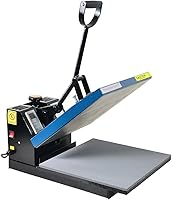
The Fancierstudio Digital Heat Press has electronic time and heat controls, plus adjustable pressure. Choose a press only if its instructions and working area suit your project, and follow Cricut's recommended settings for the blank.
Keep the press away from children and loose items, and don't touch the heated platen. Use heat-resistant gloves only when handling a hot item if the project instructions allow it; gloves do not make it safe to touch the platen.
What common mistakes affect pen transfers?
The most preventable problems are using the wrong paper or blank, forgetting to mirror text, and moving the transfer during pressing. Confirm each material and step before you draw, since mistakes can waste the blank and paper.
- Backward wording: mirror text and directional designs before drawing.
- Unclear lines: enlarge small details and leave open space around lettering.
- Wrong paper: use the paper Cricut specifies for the pen transfer.
- Unexpected blank color: check how the blank's color will show through the design.
- Shifted artwork: position the paper carefully and follow the instructions for holding it in place.
- Incorrect heat: use the guidance for the exact blank instead of guessing settings.
If you are also cutting Infusible Ink materials with a Cricut machine, follow the separate how to cut Infusible Ink with Cricut steps. Cutting instructions don't replace pen-transfer instructions.
Which supplies do you need for a pen transfer?
Start with a compatible blank, Cricut Infusible Ink pen, laser copy paper, and the press and protective materials specified for your project. Add only tools that solve a real setup need, such as a lint roller if the instructions call for removing lint.
A waterslide decal paper, such as Hayes, belongs to a separate craft method. A heat press can help control time and temperature, while gloves are only for handling hot items when appropriate.
For a straightforward project, follow the exact instructions for the blank you chose and keep the drawing paper flat until transfer. Pick the pen method when you want to draw a design, choose transfer sheets when you want that format, and use how to create sublimation designs in Cricut when planning artwork for a different workflow.
Frequently asked questions
Do you mirror Cricut Infusible Ink pen designs?
Mirror the design before drawing when it includes words, numbers, or an image that must face a certain way after transfer. A simple design without a clear direction may not need mirroring, but check the instructions for your project and blank before you start.
What paper do you use with Cricut Infusible Ink pens?
Use laser copy paper for pen transfers, following Cricut's instructions for the specific pen and project. Waterslide paper, sticker paper, and transfer sheets are made for different processes, so don't substitute them for the drawing paper in a pen transfer.
Can you use Cricut Infusible Ink pens on any shirt?
No. Infusible Ink transfers need a compatible blank, and results depend on the fabric and its color.
Check Cricut's compatibility guidance for your blank before drawing; a regular cotton shirt may not give the intended result.
Do Cricut Infusible Ink pens need heat?
Yes, heat transfers the ink from the paper into a compatible blank. Use the time, temperature, and method specified for your particular project, and keep the press surface stable while it heats.